Access and setup handled over WhatsApp  ·  Get access to Facebook Auto Poster →
Home/Premium Software/Facebook Auto Poster
Access via WhatsApp

Facebook Auto Poster

Show up in dozens of Facebook groups every day — without spending your day posting. Compose once, pick your groups, set the schedule, and the app publishes posts, images and videos across all your accounts.

Windows 10 & 11 Guided setup Multiple accounts v1.0.0 · App + Chrome extension
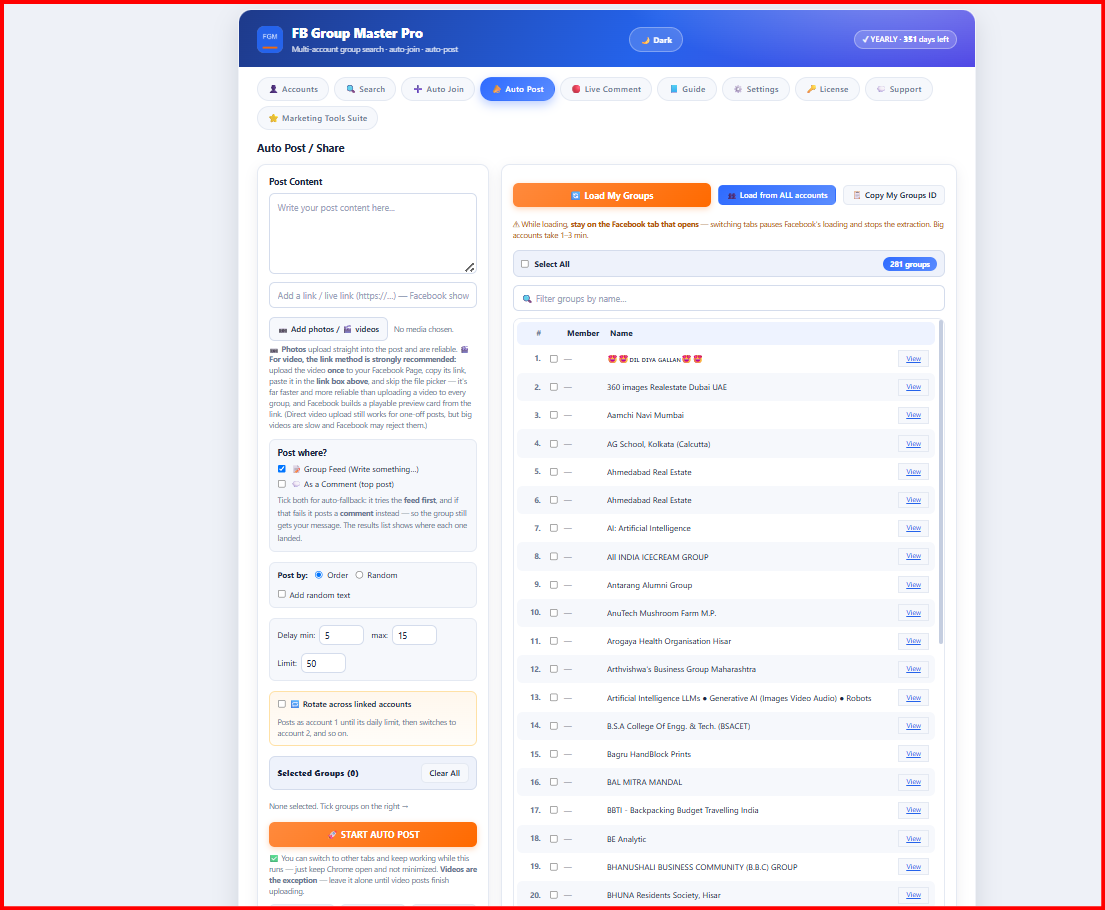
Facebook Auto Poster — Auto Post screen with post composer, delays and group list

A tour of Facebook Auto Poster

Everything you need for group marketing

Auto-Post to Multiple Groups

Select once, publish everywhere. One post goes to every group you choose, spaced out naturally.

Schedule Posts

Queue posts for the days and times your audience is online — mornings, evenings, weekends — and let it run.

Image Posting

Single images or multi-photo posts — product shots, offers, testimonials — attached automatically.

Video Posting

Publish video posts to every group — the highest-engagement format on Facebook, automated.

Multiple Facebook Accounts

Run business and personal accounts side by side, each with its own group sets and schedules.

Group Management

Organize groups into named sets — local buyers, niche communities, B2B — and target each differently.

Windows app + Chrome extension Runs on your PC — you stay in control No Monthly Subscription

Facebook groups are free traffic — if you show up daily

Groups are where local customers ask for recommendations and buy. The businesses that win are simply the ones that post consistently. Facebook Auto Poster makes consistency automatic.

Reclaim your mornings

Posting to 40 groups by hand takes hours. Load the queue on Monday and the whole week runs itself.

Compounding visibility

Daily presence in dozens of groups keeps your business the first name people think of.

Right post, right group

Group sets let you send retail offers to buyer groups and trade offers to B2B groups — automatically.

Ad-level reach, zero ad spend

Groups reach thousands of local, high-intent members — without paying per click.

A week of promotion in five steps

1

Connect your accounts

Add one or more Facebook accounts. Each account keeps its own groups, sets and posting schedule.

2

Add and organize groups

Import the groups you're a member of and sort them into sets — local buyers, niche communities, wholesale.

3

Compose your post

Write the text and attach images or a video. Save it as a template if you'll reuse it.

4

Pick groups and schedule

Choose the group sets and posting times. Natural spacing between posts is applied automatically.

5

Let it run

The queue publishes on schedule and logs every post — posted, queued, or skipped — so you always know what went where.

One simple yearly licence, every feature included

Want all three apps? Get the bundle for ₹6,999 / $79 and save over 22%.

Facebook Auto Poster FAQs

Access is arranged over WhatsApp. Tell us what you need, we confirm pricing and the right product for you, and we send the installer and your licence key after purchase. We can walk you through setup on the same conversation.
After payment via Google Pay, PayPal or Binance you receive a license key by email or WhatsApp — usually within a few hours. Paste it into the activation screen and the software unlocks instantly.
One license activates one Windows PC. Moving to a new computer? Contact support and we'll transfer your activation free of charge.
Free while your license is active. Download the latest zip, run the new setup, replace your Extension folder and press Reload in chrome://extensions — accounts, groups and license all stay intact.
Posting is paused, but nothing is deleted — your accounts, group sets and scheduled posts stay saved on your PC. Buy a license, enter the key, and pick up exactly where you left off.

Complete your marketing stack

Learn to get the most from it

Free tools

Related free tools

Website services

Need a website that brings customers?

We build websites for restaurants, hotels, gyms and local businesses. Check your current site free, or ask for a quote.