
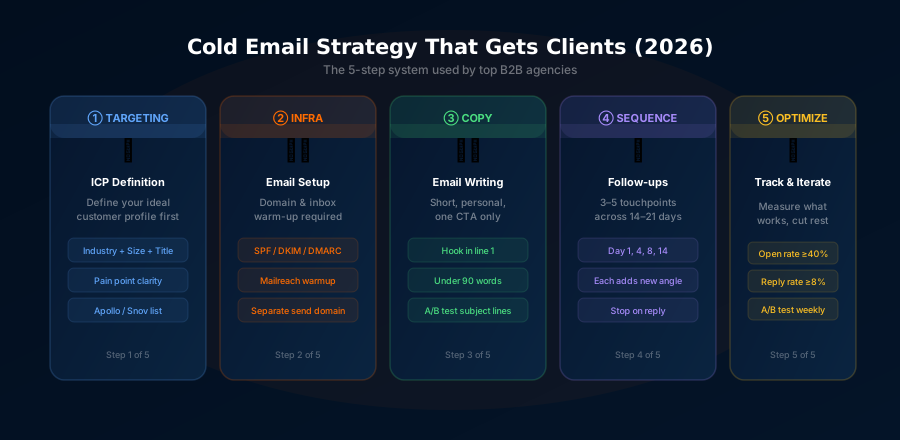
The 5-Step Cold Email System at a Glance
Define ICP → Build list with Apollo → Warm inbox with Mailreach → Write sequences in Instantly → Manage pipeline in Pipedrive. That's the entire system. The sections below break down exactly how to execute each step.
Why Cold Email Still Beats Ads in 2026
A client of ours was spending $8,000 a month on Google Ads. Not $8,000 total, $8,000 every single month. And after months of testing landing pages, adjusting bids, and firing two different ad agencies, they were getting a handful of leads, most of which weren't even close to their ICP.
Three months after switching to cold email, the picture looked completely different. They were spending $150/month on tools. They had closed 14 new clients. And they had a waitlist.
Cold email doesn't get the glory that paid ads do. It doesn't have slick dashboards or impressions or CTR graphs you can show to a board. But for B2B service businesses, agencies, consultants, SaaS companies, nothing in the marketing stack even comes close to the return on investment that a well-built cold email system delivers.
This guide is the complete playbook. Not a high-level overview, the actual step-by-step system we use and recommend to clients. By the end, you'll have everything you need to build it, launch it, and optimize it.
The Business Case for Cold Email
Let's talk numbers before we get into tactics, because the economics here are compelling.
In B2B, cost per lead on Google Ads typically ranges from $50 to $200 depending on your industry and how competitive your keywords are. LinkedIn Ads are even worse, $80 to $300+ per lead is common for anything finance, SaaS, or professional services adjacent.
Cold email, when done properly, costs between $3 and $8 per lead including tool costs and the time it takes to build and run the system. That's not a typo. The math is just different.
Here's what makes it even more compelling:
- Direct access to decision makers. You're not waiting for a VP of Sales to stumble across your LinkedIn ad. You're landing in their inbox, from a real person, with a message that looks like it was written for them.
- Scalable without headcount. Once your sequences are written and your infrastructure is in place, sending 500 emails a day doesn't require more people, just more sending accounts.
- It compounds. Every reply, every conversation, every case study you earn from cold email makes your next campaign better. Ads don't compound like that.
- It outperforms LinkedIn DMs for most niches, primarily because email is still the primary communication channel for business decisions, and a well-structured cold email feels more considered than a LinkedIn connection request with a pitch.
The caveat, and it's an important one, is that cold email done badly doesn't just underperform. It damages your domain reputation, can get you flagged as spam, and wastes weeks of effort. The rest of this guide is about making sure you do it right.
Before You Send a Single Email: The 3 Non-Negotiables
There are three things that absolutely must be in place before you launch any cold email campaign. Skip any one of them and you're setting yourself up for poor results or outright failure.
1. A Clearly Defined ICP
Not "small businesses" or "marketing agencies." You need a specific, actionable Ideal Customer Profile. We'll build this in Step 1 below, but if you start emailing before you've defined exactly who you're targeting, you'll waste your lead budget and produce confusing data that's impossible to act on.
2. A Separate Sending Domain
Never send cold email from your primary business domain. Full stop. If your company website is acme.com, you send cold email from acme-outreach.com or getacme.com or tryacme.com. This protects your main domain's reputation from any deliverability issues, and it's standard practice for anyone serious about this channel.
Set up your new domain with the correct SPF, DKIM, and DMARC records. Most domain registrars have one-click options for this now. It takes 15 minutes and it matters enormously.
3. Inbox Warming
Warming means gradually sending and receiving emails from your new domain for 2-3 weeks before launching cold outreach. Tools like Mailreach automate this entirely. More on this in Step 3.
Step 1: Define Your ICP With Precision
Most people define their ICP too broadly. "We work with companies that need marketing help" is not an ICP. "We work with SaaS companies between 50-500 employees, targeting a VP of Revenue or Head of Sales, in the US, UK, or Australia, who are using Salesforce but don't have a dedicated outbound motion yet", that's an ICP.
The more specific you are, the higher your reply rates will be. This is counterintuitive to a lot of people, shouldn't a broader audience mean more potential replies? No. A broader audience means generic messaging, which means lower engagement across the board. Specificity is what makes a cold email feel relevant rather than spammy.
The 5 ICP Variables
SaaS, e-commerce, professional services, fintech, pick 1-2 to start
Employee count is a proxy for budget. 50-500 is the sweet spot for most agencies.
US, UK, Australia, Canada, markets where decision makers are email-responsive
Reach the decision maker, not the gatekeeper. VP Sales, Head of Growth, CMO, CEO for smaller companies.
What tools do they already use? What pain does that reveal? "Using Salesforce but no outbound sequencer" signals a specific need you can address.
Real ICP Example
Industry: B2B SaaS
Company size: 50–500 employees
Title: Head of Sales OR VP Revenue OR VP Sales
Geography: United States, United Kingdom, Australia
Tech stack: Salesforce CRM + no dedicated outreach tool
Signal: Hiring for SDR/BDR roles (indicates outbound intent)
That level of specificity lets you write email copy that feels almost eerily relevant to the person reading it. Which is exactly what you want.
Step 2: Build Your Lead List With Apollo.io
Once you know exactly who you're targeting, you need a tool that can find them at scale with verified contact data. Apollo.io is the best option in 2026 for most B2B use cases. It has 275+ million B2B contacts, 65+ search filters, and email verification built in.
Here's the workflow:
- Log into Apollo and go to People search. Apply your ICP filters, industry, company size, job title, geography. Add technographic filters if relevant (e.g., "uses Salesforce").
- Build a list of 500-2,000 contacts for your first campaign. Smaller, highly targeted lists consistently outperform massive untargeted ones.
- Verify emails before exporting. Apollo has built-in verification. Use it. Bouncing more than 3% of your emails is a red flag for email providers and hurts deliverability.
- Export to CSV or push directly to your sequence tool. Apollo integrates natively with Instantly and most other senders.
Step 3: Warm Your Inbox Before Sending Anything
You've set up your sending domain. You've got a list of 500+ verified contacts. Everything is ready to go. And you need to wait three weeks before sending a single cold email. I know, it feels counterproductive. But this is non-negotiable.
When you create a new email address, that inbox has zero sending history. Email providers like Google, Microsoft, and spam filters treat zero-history domains as suspicious. If you start blasting 50 cold emails a day from day one, you'll be filtered to spam almost immediately, and the damage to your domain reputation can take months to reverse.
Inbox warming solves this by simulating normal email activity. A warming tool sends emails from your new inbox to a network of real inboxes, those inboxes reply, mark emails as important, and move them out of spam, all automatically. Over 14-21 days, this builds enough positive signal that email providers trust your domain.
How to Use Mailreach for Warming
Mailreach is our recommended warming tool. It has a network of 10,000+ real premium inboxes (not spam-trap-prone bot accounts), and it gives you a concrete inbox placement score so you can see exactly where you stand before you start sending.
The setup takes about 10 minutes:
- Connect your new sending email address to Mailreach
- Set warming volume (start at 3-5 emails/day, ramp to 20-30 over 2 weeks)
- Check your inbox score weekly, aim for 90+ before launching campaigns
- Keep warming running in the background even after you start cold outreach
Step 4: Write Cold Emails That Actually Get Replies
Most cold emails fail for one simple reason: they're about the sender, not the recipient. "We're a full-service agency with 10 years of experience helping businesses grow..." No one cares. The person reading that email is thinking about their own problems, not yours.
Good cold email copy makes the recipient feel like you did your homework specifically on them, and that you have something useful to offer.
The Framework: AIDA Adapted for B2B Cold Email
A personalized first line that proves you looked at their specific company or role
Identify a specific problem they're likely experiencing, make it specific to their situation
One concrete result or social proof, a specific number works better than a vague claim
One simple ask, a 15-minute call, a quick yes/no question. Never ask for too much.
Subject Lines That Work
Your subject line determines whether the email gets opened. The goal isn't to be clever, it's to create just enough curiosity or relevance that they click. Our highest-performing subject line formats:
- "Quick question about [Company]'s outbound"
- "[Mutual connection] suggested I reach out"
- "[Specific result] for [similar company type]"
- "[First name], re: your [recent company news]"
- "Idea for [Company], worth 2 min?"
The 3-Email Sequence
Don't send one email and give up. The data consistently shows that a significant portion of replies come from follow-ups. A 3-email sequence is the sweet spot, enough to be persistent, not enough to be annoying.
Step 5: Sending Infrastructure and Volume Management
You have the list. You have the copy. Now you need to actually send the emails in a way that maximizes deliverability and doesn't burn your domain.
Choosing Your Sending Tool
For most people starting out, Apollo's built-in sequences are the simplest option, you're already using it for lead generation, and adding sequences keeps everything in one place. As you scale or if you're managing multiple clients, Instantly.ai becomes the better choice because of its unlimited sending accounts and Unibox feature.
See our comparison: Apollo vs Instantly 2026 →
Sending Volume Guidelines
| Week | Emails/day per inbox | Status |
|---|---|---|
| Week 1 (warming) | 0 cold | Warming only |
| Week 2–3 (warming) | 0 cold | Warming only |
| Week 4 (launch) | 20–30/day | Conservative launch |
| Week 5–6 | 30–50/day | Ramp if metrics healthy |
| Week 7+ | 50–100/day | Scale |
Timing and Deliverability Tips
- Send Tuesday through Thursday. Monday inboxes are cluttered. Friday afternoons nobody's paying attention. Tuesday-Thursday, 7-9am local time for your recipient, is consistently the best window.
- Use spintax. Slight variations in wording across emails (using {Hi|Hello} {[First Name]|there}) prevent your messages from being flagged as duplicate content by spam filters.
- Keep plain text as primary. Heavy HTML emails feel like marketing newsletters. Plain text (or near-plain text) feels like a real person wrote it. That distinction matters enormously for cold email.
- One link maximum per email. Multiple links dramatically increase spam filter hits. Save the resource sharing for Email 2 of your sequence, and only include one link.
- Check your inbox placement score weekly with Mailreach. If it drops below 80, pause campaigns, diagnose the issue, and recover before sending more.
Step 6: Managing Replies and Closing in Pipedrive
Here's where a lot of people drop the ball. They spend weeks building the system, launch their campaign, start getting replies, and then let warm leads go cold because there's no structure to handle them. Don't let that be you.
When a positive reply comes in, that lead needs to move into a CRM immediately. Pipedrive is our CRM of choice for cold email-driven pipelines because it's built for sales teams, it's intuitive, and it has the right set of features without overwhelming you with complexity.
The 5-Stage Cold Email Pipeline
The single most important discipline in cold email pipeline management is speed. When someone replies positively, respond within 2 hours. Move them to Pipedrive the same day. Book the call the same week. The window of intent is short, people move on quickly.
What Good Cold Email Metrics Actually Look Like
One of the most common mistakes is comparing your metrics to unrealistic benchmarks and giving up too early, or not knowing when something is broken. Here's a practical reference table:
| Metric | Needs work | Good | Excellent |
|---|---|---|---|
| Open rate | < 30% | 40–50% | 55–65% |
| Reply rate | < 2% | 4–6% | 8–12% |
| Positive-reply % | < 30% | 50–60% | 70%+ |
| Meeting-book rate | < 5% | 10–15% | 20%+ |
If your open rate is below 30%, the problem is deliverability, check your inbox score in Mailreach and address domain reputation issues first before changing copy. If your open rate is good but reply rate is low, the problem is copy or targeting. If reply rate is good but positive reply percentage is low, your ICP needs refinement.
The 30-Day Launch Timeline
Here's the exact sequence of events to go from zero to live campaign:
Register sending domain. Set up Google Workspace or Microsoft 365 email. Configure SPF, DKIM, DMARC records. Define and document your ICP.
Set up Apollo.io. Apply ICP filters. Export your first list of 500 verified contacts. Segment if needed (e.g., by sub-industry or company size).
Connect sending inbox to Mailreach. Do NOT send cold emails during this period. Check inbox score weekly. By day 21, score should be 85+.
While warming continues, write your 3-email sequence. Draft at least 3 subject line variants for A/B testing. Get it reviewed.
Start sending, 20 emails/day. Schedule for Tuesday-Thursday 7-9am. Set up Pipedrive pipeline to receive replies.
First positive replies and booked calls. Analyze open and reply rate data. Iterate on subject lines and first-line personalization.
System is data-backed. Scale to 100+ emails/day. Add a second sending account if needed. First clients signed and onboarded.
5 Cold Email Mistakes That Kill Campaigns
These aren't hypothetical. We see these patterns repeatedly with new campaigns.
- Wrong ICP. If your targeting is off, no amount of copy optimization will save you. A 2% reply rate often means the audience is wrong, not the email. Niche down further and test a new segment.
- No inbox warmup. Already covered this, but it bears repeating: if you skip warmup, your emails go to spam. Period. The data is unambiguous on this.
- Copy that's all about you. "We offer X, Y, Z services and have worked with Fortune 500 clients..." Nobody cares. Your first two sentences need to be about the prospect, their situation, and a problem they recognize. Start there.
- Expecting high reply rates. A 6% reply rate is excellent. If you're expecting 20-30% like you might get from an email newsletter to engaged subscribers, you'll be disappointed and give up too early. Set realistic expectations.
- Not following up. 40-60% of replies come from follow-up emails. Sending one email and moving on is leaving enormous results on the table. Your 3-email sequence is not optional, it's a core part of what makes this work.
The honest reality of cold email after running this system across dozens of accounts: 70% of the failures I see aren't strategy failures or copy failures. They're operational ones. The campaign that doesn't get a domain warm-up because the founder wanted to ship "this week." The team that buys Apollo Pro but never builds saved searches, so every new SDR rebuilds the ICP from scratch. The handoff between SDR and AE that takes 4 days when 24 hours was the conversion-rate ceiling. The system in this guide is repeatable, but the discipline behind it is non-negotiable. If you don't have someone who owns the day-by-day operations, pick a smaller channel; cold email punishes neglect faster than ads do because deliverability compounds in the wrong direction.
Frequently Asked Questions
Your Full Cold Email Stack for Under $75/Month
Apollo (leads) + Mailreach (warmup) + Instantly (sequences) + Pipedrive (pipeline). Everything you need to close 10-30 B2B clients per month.